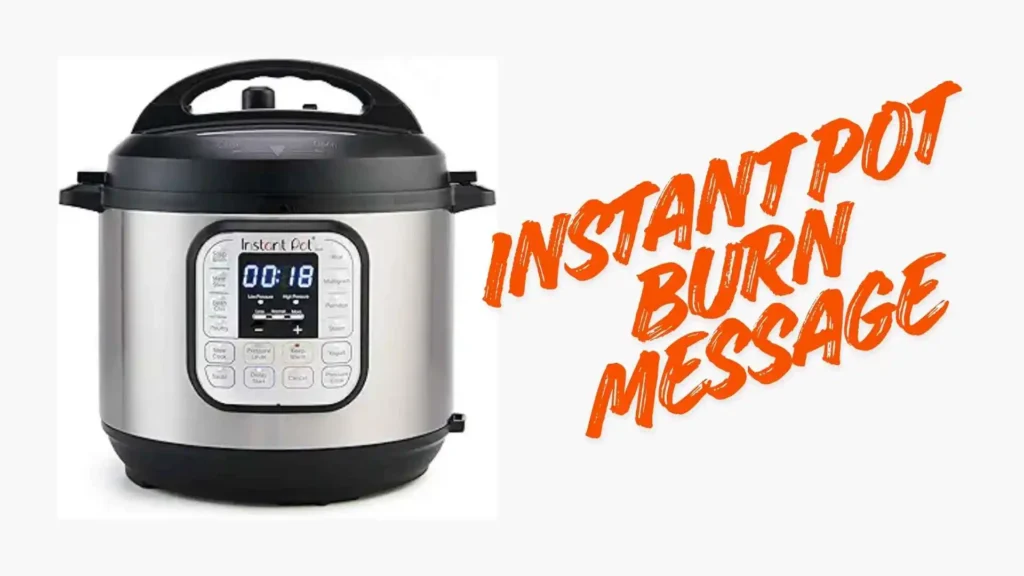
It was a Tuesday night, and I was exhausted. I threw ingredients for chili into my pressure cooker. I was ready to relax while dinner cooked itself. Ten minutes later, I heard a beep. I looked at the display and saw the dreaded Instant pot burn message. My heart sank.
That flashing screen is the enemy of a quick dinner. I used to panic when I saw it. I thought my machine was broken or my food was ruined. But over time, I learned exactly why the Instant pot burn message happens and how to fix it fast.
I want to share my experience with you. I will walk you through what this error means. We will look at why it pops up during your favorite meals. I will also show you how I clear the Instant pot burn message and save my dinner.
What Is the Instant Pot Burn Message?
This error is actually a safety feature. It feels annoying, but it helps you. The sensor at the bottom of the pot detects high heat. If the temperature gets too high, the machine thinks food is burning.
The cooker stops heating to prevent a fire or ruined food. It displays the Instant pot burn message to alert you. This usually means the bottom of the stainless steel inner pot is too hot. Food might be stuck there.

I treat this warning like a check engine light. It tells me something is wrong under the hood. The machine pauses the cooking cycle so I can intervene. It gives me a chance to fix the issue before my meal turns into charcoal.
Why I Keep Seeing the Instant Pot Burn Message
There are a few reasons this error haunts my kitchen. The most common culprit is a lack of thin liquid. Pressure cookers need steam to work. Steam comes from water, broth, or thin juices.
If the liquid is too thick, it won’t create steam. Instead, it sits at the bottom and boils. This triggers the Instant pot burn message very quickly. I notice this often when I make pasta dishes or thick stews.
Another reason is the Saute function. I love browning meat before pressure cooking. It adds flavor. But if I don’t scrape the brown bits off the bottom, they burn later. Those tasty bits confuse the sensor and cause the Instant pot burn message to appear.
Common Triggers for the Burn Error
I have found that certain ingredients are troublemakers. Tomato products are the worst offenders for me. Tomato paste and crushed tomatoes scorch easily. They sink to the bottom and stick.
Cream-based sauces are also risky. Dairy separates and burns under pressure. I never add cream until after the pressure cycle is done. This simple rule helps me avoid the Instant pot burn message most of the time.
Starchy foods like rice or pasta can also cause issues. As they cook, they release starch. This thickens the liquid at the bottom. If there isn’t enough water, the sensor detects overheating and flashes the error.
How to Clear the Instant Pot Burn Message
When the error flashes, do not panic. I used to turn the machine off and give up. Now, I have a routine. First, I press the Cancel button. This stops the heat immediately.
Next, I switch the valve to Venting to release the pressure. I wait for the pin to drop. Safety is key here. Once the lid is open, I check the food. Usually, the meal is not ruined yet.
I stir the contents and scrape the bottom of the pot with a wooden spoon. I almost always find food stuck there. Removing this layer often solves the problem. This is the fastest way to clear the Instant pot burn message and get back to cooking.
Adding More Liquid
After scraping, I check the liquid level. If the sauce looks dry or thick, I add water or broth. I usually add about half a cup. This helps generate the steam needed to pressurize.
I stir everything well to incorporate the new liquid. Then, I try to seal the lid again. I restart the cooking cycle. Most of the time, this extra liquid prevents the Instant pot burn message from coming back.
If the food is nearly cooked, I might finish it on Saute mode. I stir constantly to prevent sticking. This gives me control over the heat. It is a good backup plan if the sensor is being too sensitive.
Preventing the Instant Pot Burn Message
Prevention is better than a cure. I have changed how I load my pot. I use a layering technique now. I put the thin liquid and vegetables at the bottom.
I place the meat on top of the vegetables. Then, I add the thick sauces or tomato paste on the very top. I do not stir it in. Keeping the thick sauce away from the bottom prevents the Instant pot burn message effectively.
Another trick is the pot-in-pot method. I use this for thick oatmeal or lasagna. I put water in the main pot and place my food in a smaller bowl on a trivet. The food never touches the heating element.
| Ingredient Type | Risk Level | My Tip |
| Water/Broth | Low | Use as a base for every meal. |
| Tomatoes | High | Layer on top, do not stir. |
| Cream/Milk | High | Add after pressure cooking. |
| Rice/Pasta | Medium | Ensure plenty of thin liquid. |
| Flour/Starch | High | Use to thicken at the end only. |
The Pros and Cons of the Sensor
It is easy to hate this error code. However, it serves a purpose. I have weighed the good and the bad based on my years of cooking.
Pros:
- It saves your dinner from burning completely.
- It protects the appliance from damage.
- It alerts you to check on your food.
- It helps you learn better cooking ratios.
- It prevents smoke from filling the kitchen.
Cons:
- It stops the cooking process mid-cycle.
- It can be overly sensitive on some models.
- It requires manual intervention to fix.
- It delays mealtime when you are hungry.
The Instant pot burn message creates anxiety for new users.
Comparing Cooking Methods
I often compare my electric pressure cooker to other methods. The burn error is unique to these smart devices. Stovetop pressure cookers do not have sensors. They will just burn your food if you are not careful.
A slow cooker rarely burns food because the heat is low. But it takes all day. The electric pressure cooker is faster, but the Instant pot burn message is the trade-off for that speed. It demands specific liquid ratios that other methods do not.
If I use a standard pot on the stove, I can stir. I can lower the heat instantly. I cannot do that when the lid is locked under pressure. That is why the sensor exists.
Final Thoughts on the Instant Pot Burn Message
Dealing with this error is a rite of passage. Every home cook sees it eventually. It does not mean you are a bad cook. It just means the pot needs more water or less heat.
I have learned to embrace the quirks of my machine. I deglaze my pot religiously. I layer my ingredients with care. These small habits keep the Instant pot burn message away from my kitchen.
Next time you hear that beep, take a deep breath. Release the steam and check the bottom. Add a splash of water. You will have dinner on the table in no time, error-free.
Expert Insights FAQ
What does the burn message mean on my Instant Pot?
It means the sensor detects high heat at the bottom of the pot. The cooker stops heating to prevent food from burning or the unit from overheating.
Can I ignore the burn message and keep cooking?
No, the unit stops heating automatically. You must release pressure, open the lid, and fix the issue by adding liquid or scraping the pot bottom.
Why do I get the burn message with tomato sauce?
Tomato sauce is thick and sugary. It sinks to the bottom and scorches easily. Layer it on top of other ingredients and do not stir to avoid this.
How much liquid do I need to stop the burn error?
You generally need at least 1 to 1.5 cups of thin liquid like water or broth. Thick sauces do not count toward this minimum liquid requirement.
Does the pot-in-pot method prevent the burn message?
Yes, it is very effective. Since food cooks in a separate bowl above the water, it never touches the heating element, preventing the sensor from triggering.